
Overview
Aomi is the blockchain harness for agentic AI. Every Aomi App ships with performant on-chain transactions by default — simulation-first execution, non-custodial wallet integration, and real-time streaming. You bring your APIs, configure an Aomi App with your tools and a system prompt, and deploy it across multiple channels without managing LLMs or infrastructure.
How It Works
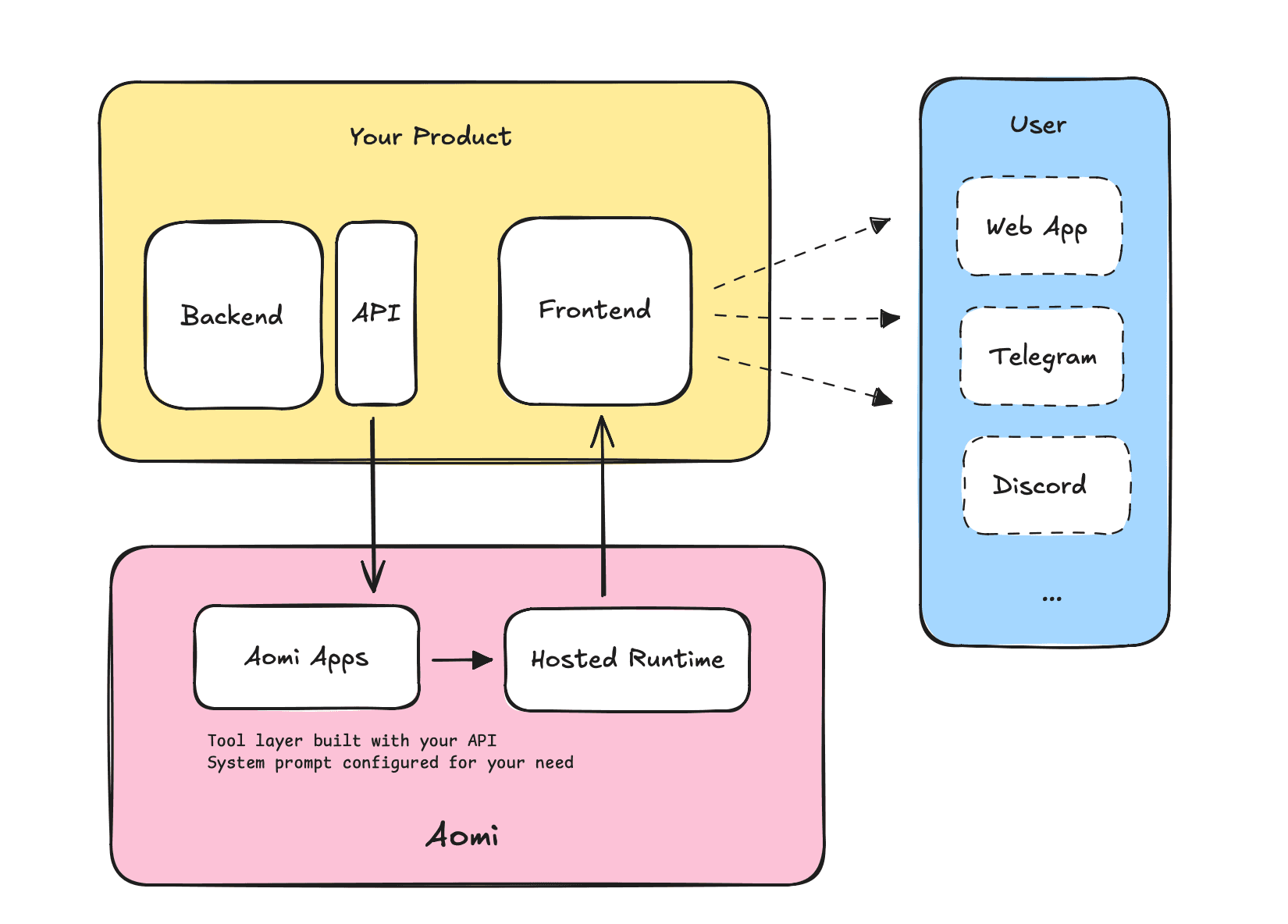
- You provide your APIs -- REST endpoints, data feeds, trading actions, whatever your product does.
- Aomi wraps them as AI tools -- each API becomes a tool the Aomi App can invoke during conversations.
- We host the runtime -- configured with your branding, instructions, and model preferences.
- Users interact -- via an embedded chat widget, a headless integration, or a Telegram bot.
Transaction Pipeline
Aomi treats every on-chain transaction as a first-class operation with built-in safety guarantees.
Before any transaction reaches a user's wallet, Aomi forks the current network state using Anvil and simulates the transaction against it. The user sees exact token changes, gas costs, and contract calls before signing anything. This simulation-first approach is how the system prevents AI-generated transactions from executing without verification.
Aomi is non-custodial by design. It never holds private keys or funds. Wallet connection and account management run through Para, while transaction signing still happens locally in the user's wallet through wagmi-compatible connectors. The AI constructs and proposes transactions; the wallet signs them. Account abstraction is supported for session keys, gas sponsorship, and batched operations — smoother UX without compromising custody.
This pipeline applies across all channels. Whether a user transacts through the web widget or a Telegram bot, the same simulation and approval flow runs.
Key Features
Streaming Responses
Responses stream in real-time via Server-Sent Events. Text appears as the model generates it, with tool calls and results displayed inline.
Tool Calling
Your APIs become AI-callable tools. When a user asks something that requires data or an action, the Aomi App calls the appropriate tool, processes the result, and responds naturally. Multiple tools can execute concurrently.
Multi-Model Support
Choose from Anthropic (Claude), OpenAI (GPT-4), or models via OpenRouter. Switch models at runtime without redeploying.
Integration Paths
| Widget (shadcn) | Headless Library | Telegram Bot | |
|---|---|---|---|
| Setup time | Minutes | Hours | Managed by Aomi |
| Install method | npx shadcn add | npm install | No frontend code |
| UI included | Full chat interface, sidebar, controls | None — build your own | Telegram-native |
| Customization | Edit copied source files | Build from scratch | Bot commands and panels |
| Dependencies | @aomi-labs/react, @assistant-ui/react, shadcn primitives | @aomi-labs/react, @assistant-ui/react | None |
| Framework | Next.js (React) | Any React app (API client works anywhere) | N/A |
| Code ownership | Components copied to your project | Library imported from npm | Hosted by Aomi |
| Best for | Quick integration, standard chat UI, projects using shadcn/ui | Fully custom designs, non-standard layouts, maximum control | Reaching users on Telegram without frontend deployment |
Widget (shadcn)
Pre-built UI components installed via the shadcn CLI. Complete chat interface out of the box, with every line of source code editable.
npx shadcn add https://aomi.dev/r/aomi-frame.jsonHeadless Library
Pure logic distributed as an npm package. Hooks, providers, API client, and utilities — zero UI opinions.
npm install @aomi-labs/reactTelegram Bot
Aomi hosts the bot and connects it to the same backend and tools as the widget. No frontend deployment needed.
Shared Foundation
Both frontend paths use the same core. @aomi-labs/react provides all runtime logic — AomiRuntimeProvider, useAomiRuntime, useControl, useUser, and the BackendApi client. They share the same backend API endpoints for chat, threads, models, apps, and wallet operations, and the same authentication via API keys and wallet addresses.
The widget is built on top of the headless library. Installing the widget pulls in @aomi-labs/react as a dependency automatically.
Start with the widget if you want results quickly. The source code is copied into your project, so you can customize or replace individual components later. Start with the headless library if you have an existing design system and want to integrate Aomi logic into your own components from day one.
Platform Support
| Platform | Support |
|---|---|
| Next.js 15 | Primary target. App Router with Server Components. |
| React 18 / 19 | Supported via @aomi-labs/react and shadcn components. |
| Modern Browsers | Chrome, Firefox, Safari, Edge (latest 2 versions). |
Next Steps
- Getting Started — set up your first Aomi App.
- How It Works — technical deep dive into the platform pipeline.
- Widget Installation — install the full UI.
- Headless Library — install the headless package.